Ports and Protocols
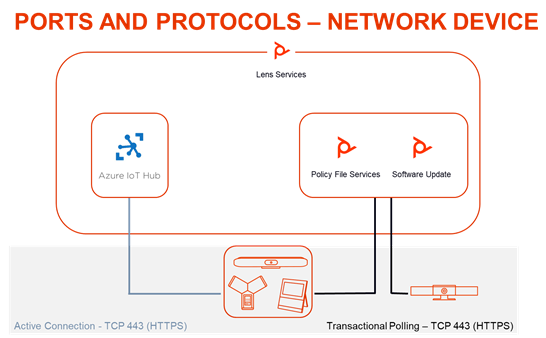
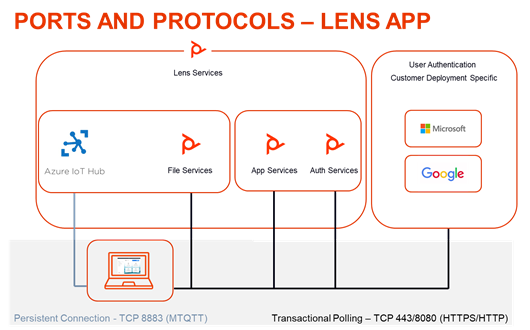
The basic ports and protocols are displayed in the graphic below.
Ports and Protocols for a Network Device
Ports and Protocols for Poly Lens Apps
Poly Lens Connection Requirements by Device Category
Note: Poly Lens Desktop additionally requires an HTTPS connection to Microsoft, Google, or Apple, and any corresponding Identity Providers based on your authentication provider deployment model.
- These are specific to each SSO implementation and are not provided by Poly.
Poly Lens Network Devices
| Destination | Type | Port | Purpose | Protocol | Security |
|---|---|---|---|---|---|
| global.azure-devices-provisioning.net | TCP | 443 | Active Management | AMQP over HTTPS | TLS 1.2 |
| lens-iot-prod-iothub-eastus2.azure-devices.net | TCP | 443 | Active Management | AMQP over HTTPS | TLS 1.2 |
| <uniqueid>.deviceprovisioning.dm.lens.poly.com | TCP | 443 | Device Policy | HTTPS | TLS 1.2 |
| swupdate.lens.poly.com | TCP | 443 | Device Software | HTTPS | TLS 1.2 |
Poly Lens Desktop
| Destination | Type | Port | Purpose | Protocol | Security |
|---|---|---|---|---|---|
| global.azure-devices-provisioning.net lens-iot-prod-iothub-eastus2.azure-devices.net | TCP | 8883 | Active Management | MQTT | TLS 1.2 |
| swupdate.lens.poly.com | TCP | 443 | Device Firmware and App Updates | HTTPS | TLS 1.2 |
| speedtest.lens.poly.com | TCP | 443 | Network Diagnostic Test | HTTPS | TLS 1.3 |
| lens-speedtest-04.eastus.azurecontainer.io | UDP | 8080 | Network Diagnostic Test | HTTP | N/A |
| login.lens.poly.com | TCP | 443 | Device User Authentication | HTTPS | TLS 1.2 |
| lens-auth0-silica-prod01.s3.amazonaws.com | TCP | 443 | Device User Authentication | HTTPS | TLS 1.2 |
| api.silica-prod01.io.lens.poly.com | TCP | 443 | Poly Lens API and Configuration Policy | HTTPS | TLS 1.2 |
Note: Also see the System Port requirements for the device. See Device Documentation for links to the documents of supported devices.